Should a Company Choose ChatGPT, Copilot, Claude, Gemini or Internal AI?
TMI Soft team, AI FDE Engineer9 min read
Quick summary
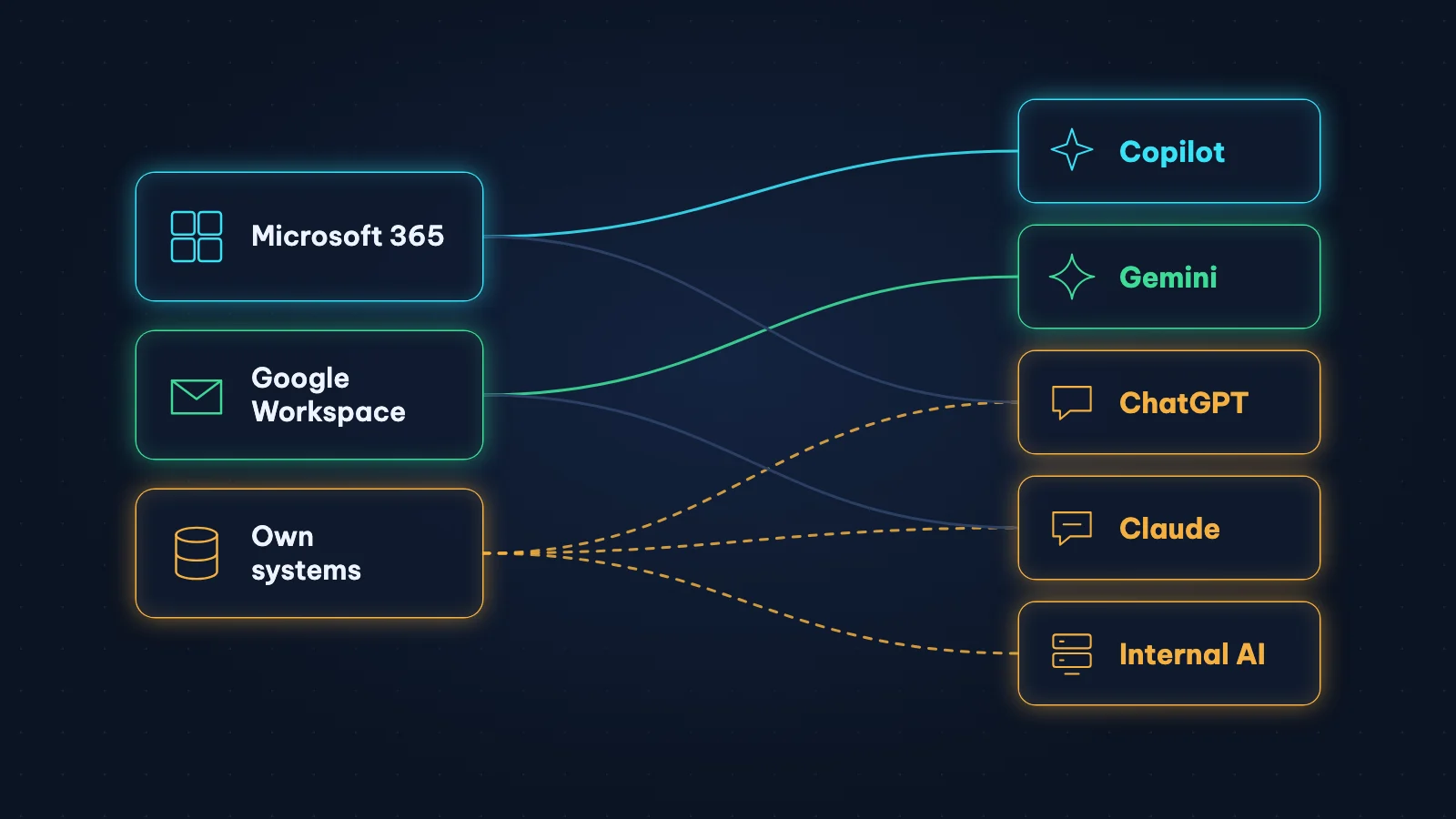
Do not choose by model rankings; choose by where your data sits. A company on Microsoft 365 should start with Copilot; on Google Workspace, use the Gemini already included; with no ecosystem, pick one shared assistant, the business edition of ChatGPT or Claude. Specialist teams add specialist tools later. Internal AI is worth considering only when data absolutely must not leave the company or the task volume is very large.
Key takeaways
- The most useful AI is the AI that can read the company’s own email, documents and meeting calendar, so choose by the ecosystem in use
- Microsoft 365 → Copilot; Google Workspace → the Gemini already included; a mix → one shared assistant, ChatGPT or Claude
- The lines between vendors are blurring: Copilot uses both OpenAI and Anthropic models, and Claude is available on AWS, Google Cloud and Azure
- Command-line tools such as Claude Code, Codex and Gemini CLI still send data to the cloud; internal AI means running open models yourself on a private server
- From 1 January 2026 the Law on Personal Data Protection applies; classify data before putting it into AI
“Should our company buy ChatGPT, Copilot, Claude or Gemini?” is the question we have heard most in recent consulting sessions. It often comes with a comparison table downloaded from the internet, showing which model is “smarter”. But for a company, model rankings change every few months, while the things that decide whether AI gets used every day change far less: where the data sits, which tools employees work in, and which data must not leave the company.
This article offers a simple way to choose based on the ecosystem a company already uses, with a reference cost table and the cases where it is worth considering locally run (on-premises) AI.
The short answer: choose by where the data sits
If you remember only one thing, remember this: the most useful AI is the AI that can read the company’s own email, documents and meeting calendar, within the access rights already in place. So:
- If the company uses Microsoft 365 (Outlook, Teams, SharePoint, Excel): start with Microsoft 365 Copilot.
- If the company uses Google Workspace (Gmail, Drive, Meet): start with Gemini, which is already included in Workspace plans.
- If the company follows no particular ecosystem, or uses a mix: choose one shared assistant for the whole company, a business edition of ChatGPT or Claude.
- If data must absolutely not leave the company: consider AI running on a private cloud or an internal server, accepting higher operating costs.
After that first step, specialist teams (analytics, marketing, engineering) add specialist tools according to real needs.
Why not choose by “which model is best”?
There are three reasons.
First, the lines between vendors are blurring. Microsoft 365 Copilot no longer runs only OpenAI’s models: from 2026, Microsoft brought Anthropic’s Claude models into Copilot and launched Copilot Cowork built on Anthropic technology (Fortune). Conversely, Claude models can be used through all three major clouds: AWS, Google Cloud and Microsoft Azure (Anthropic). Choosing the right “entry point” matters more than choosing a name.
Second, the market changes very fast. According to Menlo Ventures’ 2026 report (a survey of nearly 400 US enterprise leaders), in enterprise spending on language model APIs, Anthropic rose from 40% to 55%, OpenAI from 27% to 31%, while Google fell from 21% to 9% in just one year (Menlo Ventures; note that Menlo is an investor in Anthropic). A purchasing decision tied tightly to “the model currently in the lead” may be out of date before the contract expires.
Third, the value lies in daily use. A model a few points better on a leaderboard does not make up for employees having to copy data back and forth between two windows. AI sitting right inside Outlook or Gmail will be used more than AI that needs a separate tab.
Five questions to answer before choosing
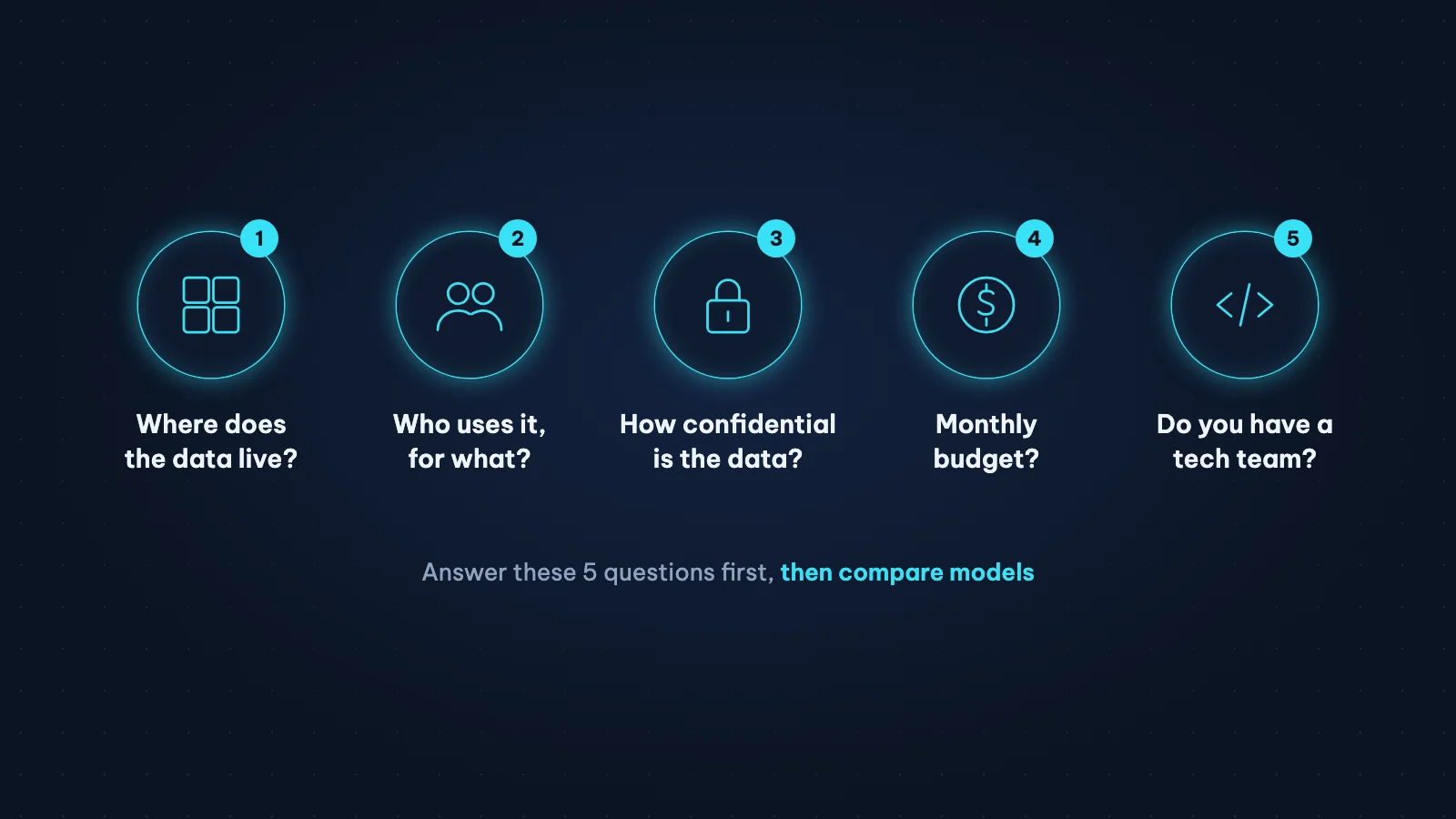
- Where does the data sit? Are email, documents and spreadsheets mostly in Microsoft or Google, or in dedicated software (ERP, CRM)?
- Who will use it, and for what? All office staff who need to draft emails and summarize meetings; or a small team that needs deep analysis, long-form writing, programming?
- How confidential is the data? Is there customer personal data, medical records, technical drawings or source code that must not leave the company?
- What is the monthly budget? Cost is calculated per user, multiplied across the year.
- Is there a technical team to build it in-house? Embedding AI into dedicated software and running internal AI both need people to operate them.
Suggestions by the ecosystem in use
| The company uses | Start with | Add when needed |
|---|---|---|
| Microsoft 365 (Outlook, Teams, SharePoint) | Microsoft 365 Copilot | ChatGPT or Claude for specialist teams; Azure when building your own AI applications |
| Google Workspace (Gmail, Drive, Meet) | Gemini included in Workspace | ChatGPT or Claude for specialist teams; Google Cloud when building your own applications |
| A mix, mostly Excel, Zalo, dedicated software | One shared assistant: ChatGPT Business or Claude Team | Connect AI to existing software through APIs |
| Has a software development team | AI coding tools: Claude Code, Codex, Gemini CLI, GitHub Copilot | Trial in parallel for 2–4 weeks on a real project, then choose |
| Data must not leave the company | Models on a private in-region cloud, or internal AI | Regular AI services for the non-sensitive data |
Microsoft 365 Copilot: the natural choice for Microsoft companies
Copilot can read email, calendar, files on OneDrive/SharePoint and Teams meetings within each employee’s own permissions, so it can answer questions like “summarize this week’s emails about project X” without any copying. This is its biggest advantage and also its risk: if shared folders have overly broad permissions, Copilot will let employees “find” files they should not be viewing. Before turning on Copilot, review document sharing permissions.
Gemini in Google Workspace: already included, so use it first
Google has dropped the add-on Gemini plan and built Gemini into the price of Workspace plans (Constellation Research). From the Business Standard plan, Gemini is present in Gmail, Docs, Meet and other apps (Google Workspace). If the company already uses Workspace, the first step is not to buy another tool but to teach employees to use what has already been paid for.
ChatGPT or Claude: a shared assistant and specialist tools
When the company is not tied to Microsoft or Google, or when a team needs deeper capability than the assistant in an office suite, ChatGPT and Claude are the two main choices. Both have business plans that by default do not use the company’s data to train models (OpenAI, Anthropic).
- ChatGPT is the most widely used, many employees are already used to the personal version, and it has many multimodal features such as image generation and voice conversation. Moving employees from personal accounts to company accounts is usually smooth.
- Claude is widely used by companies through its API and is strong at work with long documents, analysis and programming. The Team plan includes Claude Code (a coding assistant) and Claude Cowork (an agent that works on the computer) (Anthropic).
The most practical way to choose: have a group of 5–10 people try both for 2–4 weeks on their real work, then pick one as the main assistant. Running both in parallel for the whole company usually doubles cost and management effort.
Three layers of AI use in a company
Most of the “which tool to choose” debate is actually mixing three different needs. Separating them shows that each layer suits a different kind of tool.
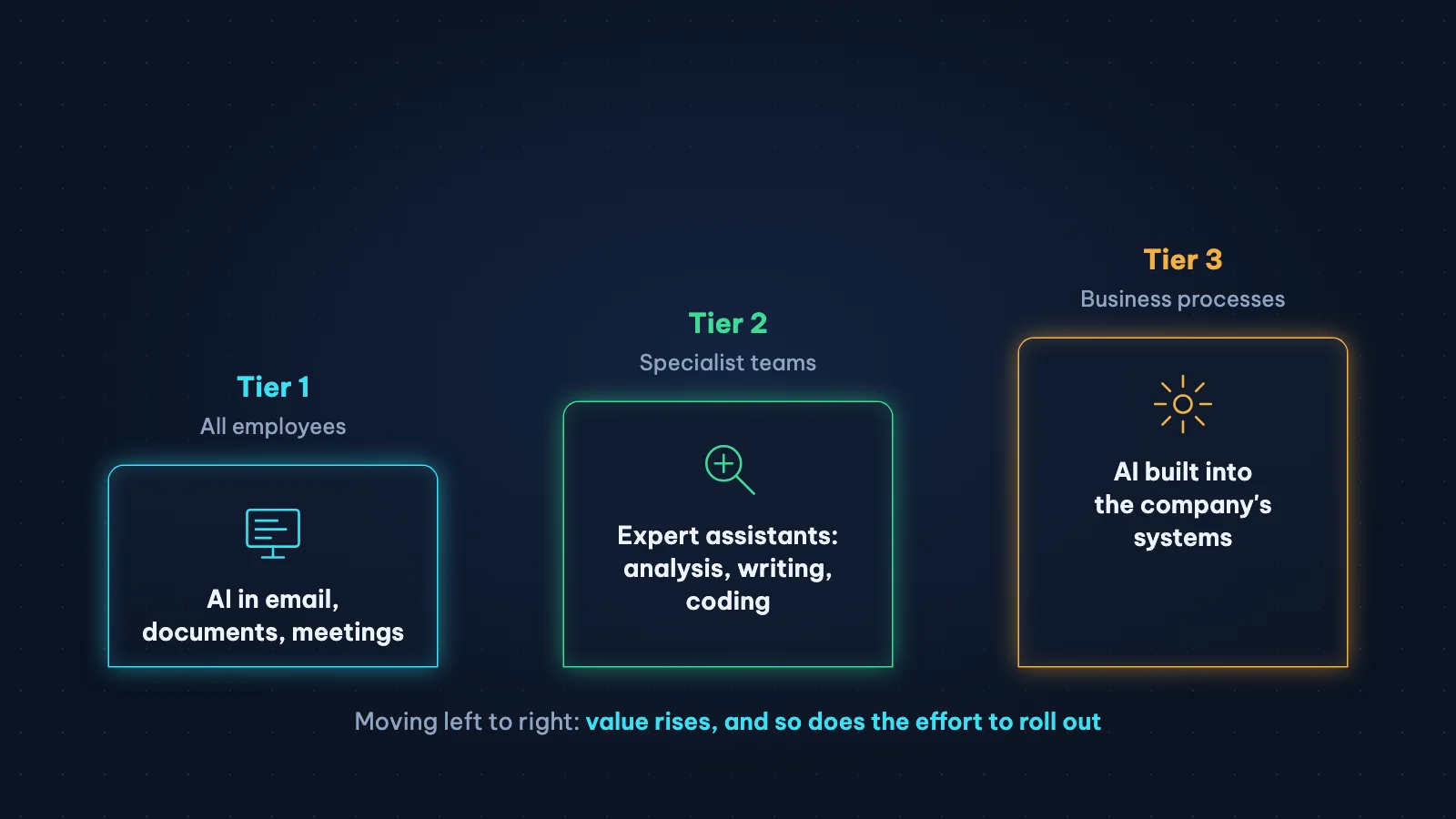
- Layer 1, all employees: drafting email, summarizing meetings, finding documents. Use the AI built into the office suite (Copilot or Gemini) or one shared assistant.
- Layer 2, specialist teams: analyzing figures, long-form writing, programming. This is where ChatGPT, Claude and command-line (CLI) tools such as Claude Code, Codex and Gemini CLI deliver value.
- Layer 3, business processes: AI reading orders, reconciling documents, answering customers, embedded directly in the company’s software. This layer needs to call models through an API and needs process and control design, so it usually needs a technical team or an implementation partner.
The greatest value usually lies in layer 3, but a company should go through layer 1 first so employees get used to working with AI.
When to consider locally run (on-premises) AI?
There is a common misunderstanding: command-line tools such as Claude Code, Codex or Gemini CLI run on the employee’s machine, but the model still runs on the provider’s cloud and data is still sent out. “Running on the machine” does not mean “data does not leave”.
Truly internal AI is when a company runs an open model on its own servers. The options today are fairly rich: OpenAI has released the open model family gpt-oss under the Apache 2.0 license, with the small version able to run on a machine with 16GB of memory (OpenAI); there are also Google’s Gemma and Alibaba’s Qwen families.
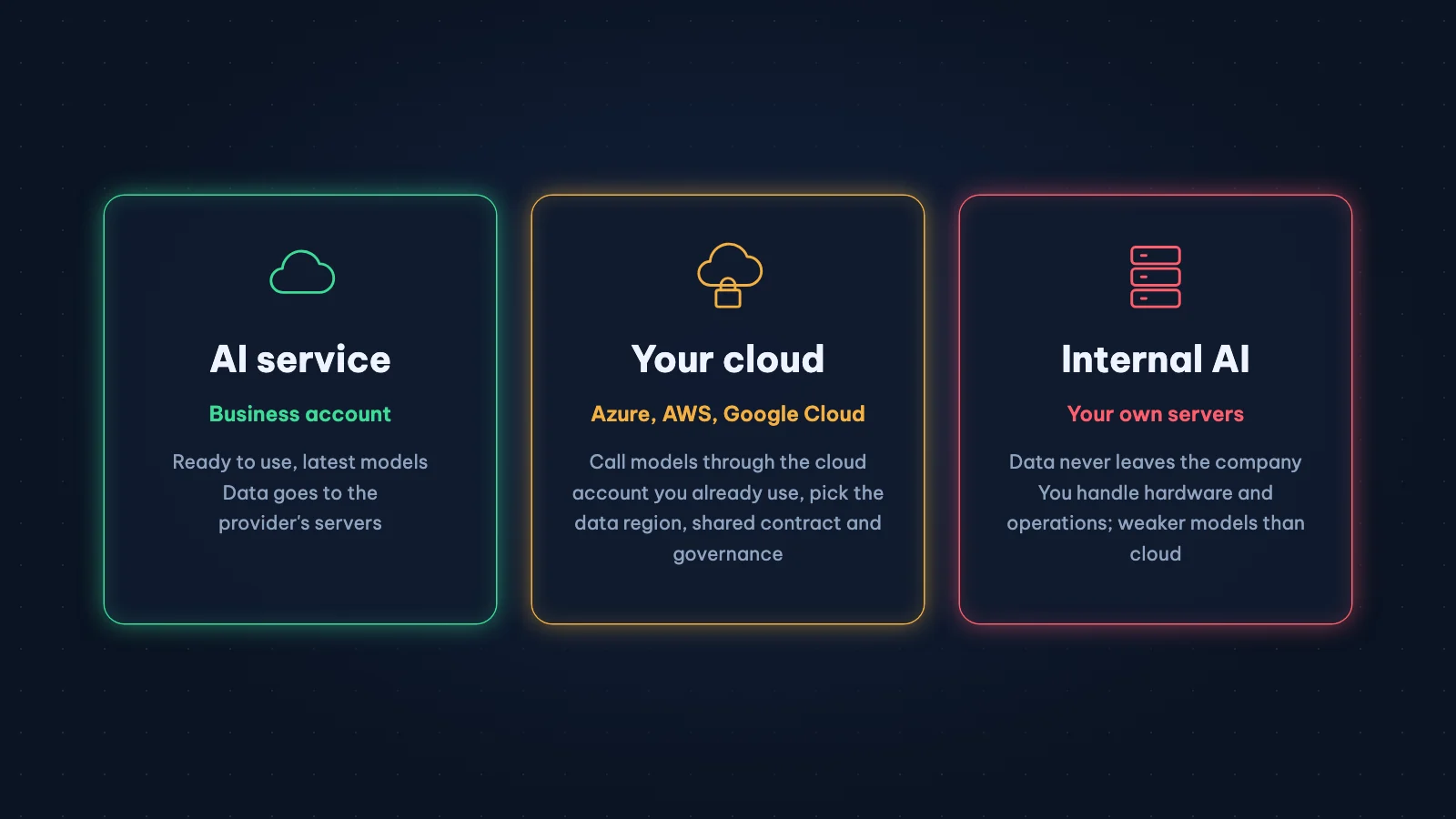
There are three ways to host AI, in order of increasing data control:
- An AI service with a company account: fast, gives access to the latest models, and data is processed on the provider’s servers under contract.
- Calling models through the cloud the company already uses (Azure, AWS, Google Cloud): you can choose the data storage region, and reuse the existing contract, permissions and monitoring. This is usually a good balance for layer 3.
- Internal AI on a private server: data does not leave the company, but the company takes care of hardware (GPU), updates, security and operators. Open models that run on modest hardware are usually still behind the latest cloud models on hard tasks.
Internal AI makes sense when: data is regulated not to leave, the volume of repetitive tasks is very large (for example classifying hundreds of thousands of documents a month), or the system has to run where the internet is not stable. For most small and medium-sized companies, internal AI is not the starting point.
A note on the Law on Personal Data Protection
The Law on Personal Data Protection No. 91/2025/QH15 takes effect on 1 January 2026 (Luật Minh Khuê). According to KPMG’s analysis, using an overseas platform to process personal data collected in Vietnam may be treated as a cross-border data transfer, with an obligation to prepare an impact assessment file (KPMG Vietnam). If you plan to put customer or employee data into AI, work with the legal department first. This is also a reason to classify data: ordinary data can use AI services, while personal and confidential data go through an in-region cloud or internal AI.
Reference costs
The prices below are list prices in USD per user per month, billed annually, excluding tax, at the time of writing (11/2026). Prices change often; check again before buying.
| Tool | Reference price | Notes |
|---|---|---|
| Microsoft 365 Copilot Business | USD 21 | Added on top of a Microsoft 365 Business plan (Microsoft) |
| Gemini in Google Workspace | Included in the plan price | Full from the Business Standard plan (Google) |
| ChatGPT Business | USD 20 (USD 25 if billed monthly) | Premium seats available for heavy users (OpenAI) |
| Claude Team | USD 20 (USD 25 if billed monthly) | USD 100 Premium seat for heavy users (Anthropic) |
| Claude Enterprise | USD 20 per seat + usage-based API fees | Minimum 20 seats (Anthropic) |
| Internal AI (open models) | No model license fee | The cost lies in GPU servers, electricity and operators |
A small tip: you do not need to buy for every employee right away. Start with 10–20% of the people with the clearest need, measure usage after 1–2 months, and only then expand.
Five common mistakes
- Buying a new tool before fully using the ones you have, for example paying for Workspace with Gemini but buying another assistant for the same work.
- Letting employees use personal AI accounts with company data, with no management and no rules.
- Turning on Copilot or Gemini while document sharing permissions are still a mess, so the AI surfaces files that should be restricted.
- Choosing internal AI because it seems cheaper, without counting hardware, electricity and operators.
- Tying processes tightly to a single model. Keep the processes, template prompts and data owned by the company, so you can switch models when the market changes.
Where to start?
A concise roadmap for a small or medium-sized company: in the first month, choose AI by the ecosystem in use and issue a policy on which data may be put into AI; in the second month, let a specialist team try specialist tools; then choose one specific business process and embed AI into the system, measuring results with numbers.
If you are torn between the options, or already have a tool but employees do not use it regularly, TMI Soft’s AI FDE team can work with you to review your existing systems, classify data and propose a suitable approach in a single consulting session.
References
- Menlo Ventures, 2026: The State of Enterprise AI (11/2026)
- Microsoft Tech Community, Microsoft 365 Copilot Business pricing (3/2026)
- Fortune, Microsoft launches Copilot Cowork with Anthropic (3/2026)
- Google Workspace, plan pricing
- Constellation Research, Google Workspace drops the add-on Gemini charge
- OpenAI Help Center, ChatGPT Business overview
- Anthropic, Claude pricing
- Anthropic, Claude on AWS, Google Cloud and Microsoft Azure
- OpenAI, introducing the open models gpt-oss (8/2025)
- Law on Personal Data Protection No. 91/2025/QH15 (Vietnamese-language source)
- KPMG Vietnam, analysis of the new Law on Personal Data Protection (Vietnamese-language source)
Frequently asked questions
Which AI should a company already using Microsoft 365 choose?
Start with Microsoft 365 Copilot, because it reads email, calendar, documents and Teams meetings within each employee’s own permissions. Before turning it on, review document sharing permissions on SharePoint and OneDrive.
If we already use Google Workspace, do we need to buy ChatGPT as well?
Not right away. Gemini is already included in Gmail, Docs and Meet from the Business Standard plan. Let employees use Gemini first, and buy ChatGPT or Claude only for teams with deeper needs such as data analysis or programming.
Should a company choose ChatGPT or Claude?
Both have business plans that by default do not use your data to train models, and the base plans cost about the same. ChatGPT is widely used and has many multimodal features; Claude is strong at long documents, analysis and programming. The best approach is to have a small group try both on real work for 2–4 weeks, then choose one.
Are Claude Code, Codex or Gemini CLI internal AI?
No. These tools run on the employee’s machine, but the model still runs on the provider’s cloud, so data is still sent out. Internal AI is when a company runs an open model such as gpt-oss, Gemma or Qwen on its own servers.
When should a company use internal AI?
When data is regulated not to leave the company, when the volume of repetitive tasks is very large, or when the system has to run where the internet is not stable. In exchange, the company has to handle GPU servers and operations itself, and accept that open models are usually behind the latest cloud models on hard tasks.