Applying AI: Why Even Processes That Have Run for Years Need to Be Redesigned
TMI Soft team, AI FDE Engineer8 min read
Quick summary
Most companies already use AI but do not yet see clear results in their business reports. The reason is usually not the tools, but that AI is attached to a process designed for human limits: handoffs by email, multi-layer approvals, weekly reports. When AI removes those limits, many steps no longer have a reason to exist. The companies that capture large value from AI are the ones willing to redraw the whole workflow, not just speed up each old step.
Key takeaways
- Attaching AI to an old process usually only makes each person faster, without changing the company’s results
- Old processes were designed around human limits; when AI removes limits, many steps lose their reason to exist
- According to McKinsey, the group of companies capturing large value from AI is nearly three times as likely to redesign workflows as the rest
- Redesigning does not mean removing people: people move to the decision and control points
- Start from a measurable process, run a parallel trial, get numbers, then scale
Over the past two years, many companies in Vietnam have bought ChatGPT, Copilot or Gemini accounts for their employees. Employees write emails faster and summarize documents faster. But when you look at the end-of-quarter report, order processing time, operating costs and the number of customers served each month have barely changed.
The question leaders often ask is: “We’re already using AI, so why haven’t the results changed?” The short answer: because AI is being attached to processes designed for a time before AI. This article explains why processes that have run stably for years also need to be redesigned, and how a company can begin.
Heavy AI use, but business results have not changed
This is not unique to Vietnamese companies. McKinsey’s The State of AI 2025 survey (nearly 2,000 respondents in 105 countries, published 11/2025) shows that 88% of organizations use AI in at least one function, but most are still at the experimentation stage and have not scaled across the company. Only 39% report any impact on profit (EBIT), and most of those say the impact is below 5%.
The GenAI Divide report from the NANDA project (MIT Media Lab, 2025) gives an even more striking number: about 95% of the organizations in the study have seen no measurable profit return from generative AI investments. According to the authors, the main cause is not weak AI models but that AI is not integrated into how work actually happens every day. AI tools mainly help individuals work faster, without changing the results of the whole company.
A lesson from 100 years ago: electricity and the factory
“New technology but no productivity gain” has happened before. In 1990, the economist Paul David (Stanford University) published the study The Dynamo and the Computer, comparing the computer with electric power in the early 20th century.
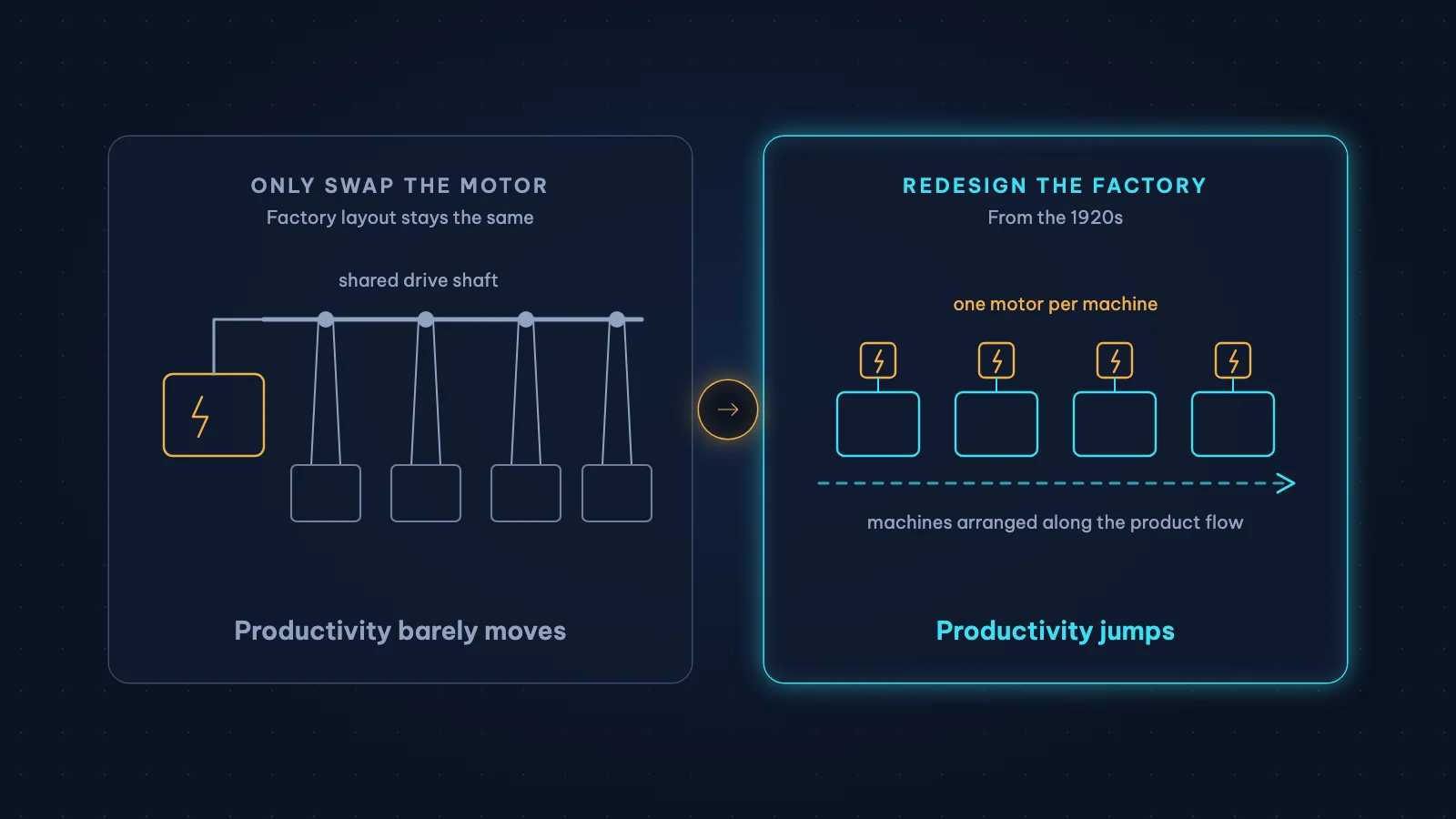
When electricity arrived, many factories did just one thing: they removed the steam engine and installed one large electric motor in exactly the same place. All the drive shafts and belts running across the shop floor stayed in place, and machines still had to be arranged around the main shaft as before. The result: electricity bills replaced coal bills, while productivity barely moved for decades.
Productivity only rose sharply from the 1920s, when factories were redesigned from scratch: each machine had its own motor, workshops were built on a single floor, and machines were arranged along the flow of the product instead of around the position of the drive shaft. The technology had existed for a long time; what created productivity was reorganizing the work around that technology.
In the same year, 1990, Michael Hammer wrote in the Harvard Business Review Reengineering Work: Don’t Automate, Obliterate, with a similar idea for the computer era: using technology to speed up an obsolete process only makes the obsolete run faster. More than 30 years later, AI is putting companies in front of exactly that question again.
Old processes were designed for old limits
Every process running in a company has a reason. But many of those reasons are human limitations at the time the process was designed:
- Reading and data entry take time, so work is split among several people, each handling one segment, and handed over by email or Excel.
- Errors are hard to catch, so each document passes through two or three layers of checking.
- Compiling figures takes a whole day, so reports are produced weekly or monthly, and decisions are slow as a result.
- Knowledge sits in the heads of experienced people, so every hard case has to wait for one particular person.
AI does not remove all of these limits, but it eases many of them considerably: AI can read invoices, emails and contracts in seconds; it can check figures against source data; it can summarize the situation at any time; it can answer based on internal documents. When the limits change, the right question is no longer “can this step be done faster with AI?” but “does this step still need to exist?”
Three levels of bringing AI into a process
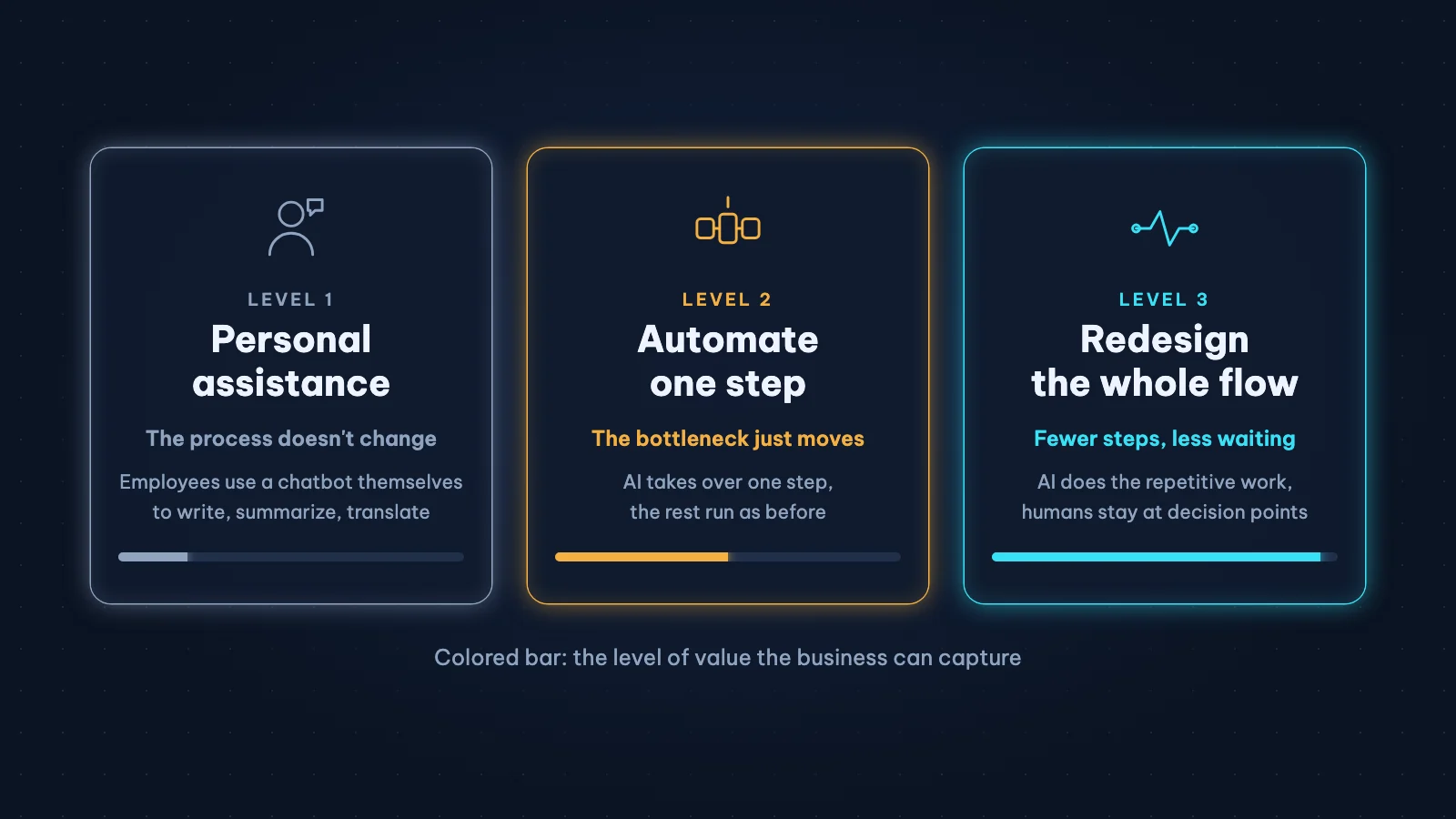
The ways a company brings AI into work can be divided into three levels:
- Personal assistance. Employees use chatbots on their own to write, summarize and translate. The process does not change; each person is a little faster, but the time saved usually does not turn into business results.
- Automating one step. AI takes over a specific step, for example reading invoices and entering them into the accounting software. The effect is clearer, but the steps before and after still run at the old pace, so the bottleneck just moves elsewhere.
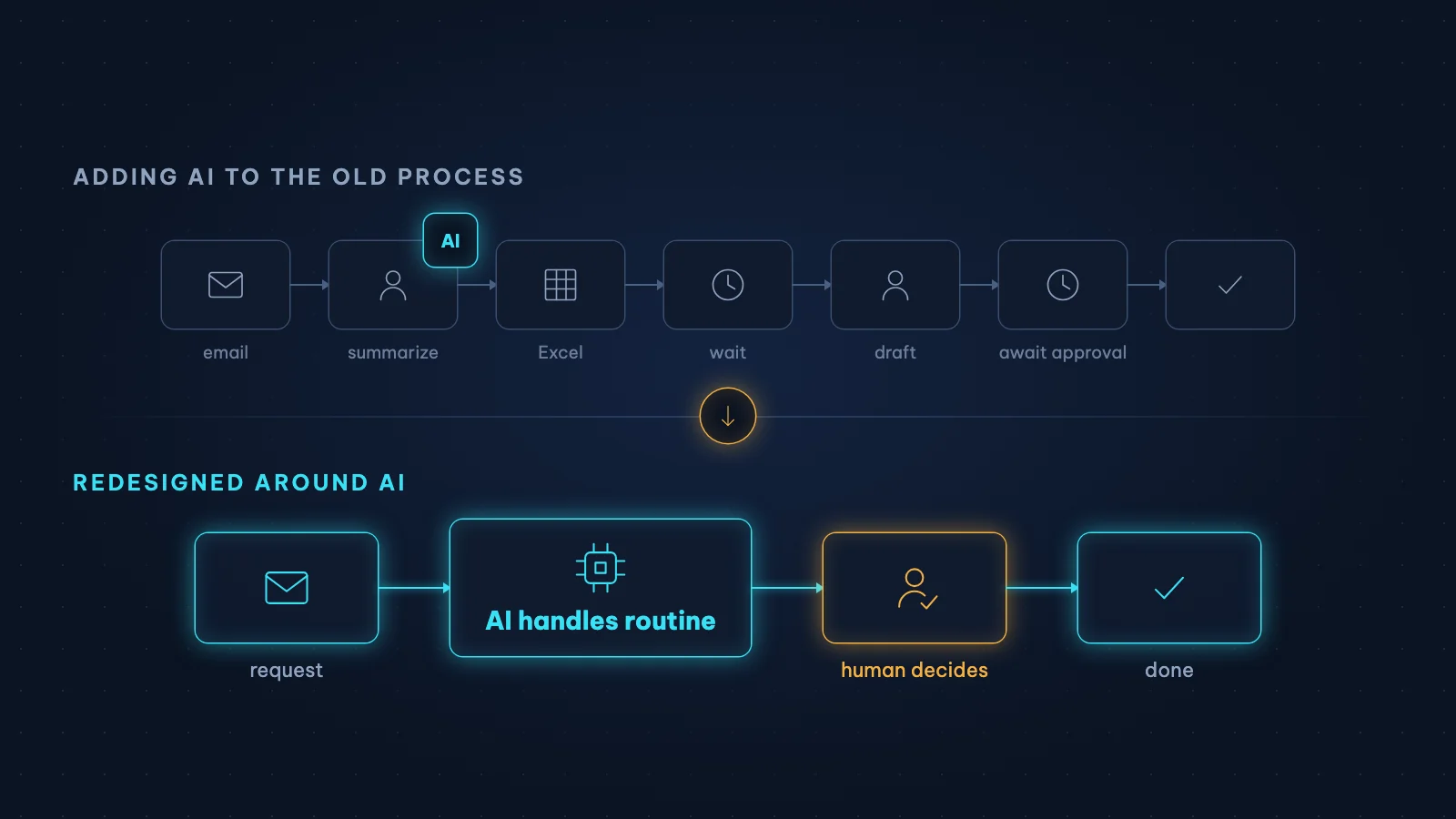
- Redesigning the whole flow. Redraw the entire process from start to finish: AI handles the repetitive parts, and people stand at the points that need decisions, negotiation or accountability. The number of steps, handoffs and waiting time all fall.
The large surveys all point to the third level. McKinsey identifies about 6% of respondents as “AI high performers” (companies with 5% or more of EBIT coming from AI), and this group is nearly three times as likely to fundamentally redesign workflows when deploying AI as the rest; this is also one of the factors most closely tied to impact on profit. BCG’s AI at Work 2025 survey (more than 10,600 people in 11 countries) distinguishes two approaches: Deploy (bringing in tools to raise productivity) and Reshape (redesigning processes). Employees at companies taking the Reshape approach save far more time than those where AI has not gone deep into daily work.
Example: the quote request process
Take an illustrative example familiar from trading and manufacturing companies: a customer sends a quote request by email.
| Step | Old process (with AI added) | Redesigned process |
|---|---|---|
| Intake | A salesperson reads the email, uses ChatGPT to summarize it, and forwards it to the technical team | AI reads the email and attachments, extracts product, quantity and delivery deadline, and creates a request ticket |
| Lookup | Technical staff check the price list and inventory in Excel and send back to sales | AI checks the price list, inventory and this customer’s past quotes, and suggests a price |
| Preparing the quote | Sales drafts the quote (with AI writing the cover letter) | A draft quote is generated, with unusual points flagged for a person to look at |
| Approval | Every quote goes to the department head for approval | Quotes within the standard threshold: sales approves. Outside the threshold (large discount, new customer): the department head approves |
| Follow-up | Manual notes, end-of-week report | The status of each quote is updated continuously, with reminders when the customer has not responded |
In the middle column, AI is present in two steps but the process stays exactly the same: three departments, many email handoffs, and every quote waiting for one approver. In the right column, the process is redrawn around the question “where do people really need to be present?”. The answer is in deciding the price for special cases and in maintaining the relationship with the customer, not in copying figures from email into Excel.
5 steps to redesign a process with AI
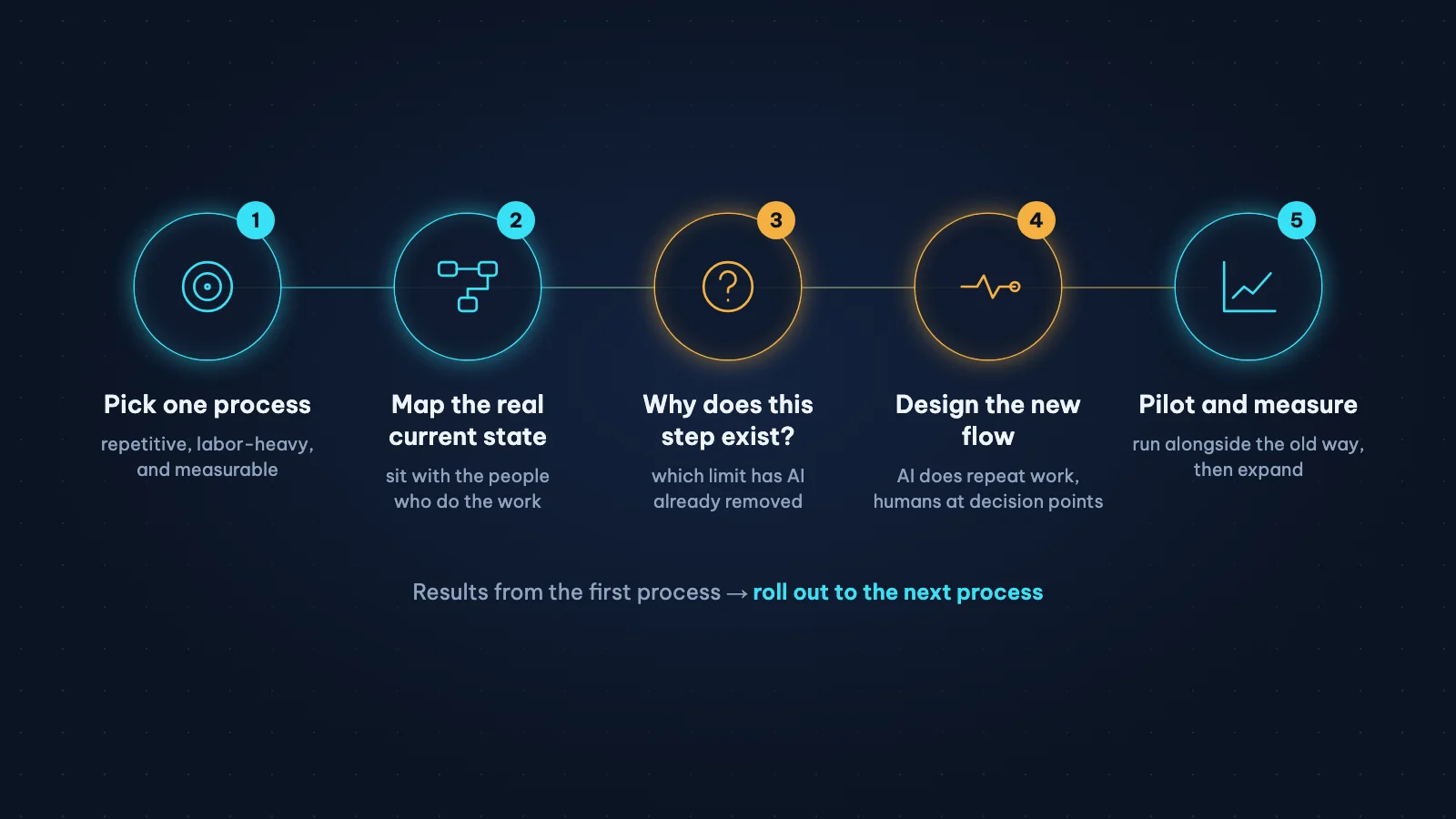
1. Choose a measurable process
Do not start with “company-wide transformation”. Choose a process that is repeated often, takes many hours of work and can be measured: processing time, number of errors, number of cases per day. Record the current figures as a baseline.
2. Map the process as it really runs
The process in the ISO manual is often different from how employees actually work. Sit with the people who do the work, watch which files they open, who they email, who they wait for, and what they correct. The steps that are “not in the manual” are often where the most time is lost.
3. For each step, ask: what limit does this step exist because of?
Slow reading? Fear of mistakes? Only one person knows? Old software that does not connect? If that limit no longer exists with AI and connected data, the step can be merged or removed.
4. Design the new flow: AI does the repetitive part, people at the decision points
Define clearly what AI does, where people check or decide, and what threshold requires handing over to a person. Redesigning a process does not mean removing people; it means placing people where they create value and take accountability.
5. Run in parallel, measure, then scale
Run the new process in parallel with the old one for a few weeks on real data. Compare against the baseline figures from step 1. Only with clear results should you switch fully to the new way and replicate it to other processes.
What companies often overlook
- People need training on the new process, not just on the tool. BCG’s survey shows that only about a third of employees feel they have been trained adequately, and those trained for 5 hours or more use AI far more regularly.
- Leaders must take part. Also per BCG, the share of employees with a positive view of AI rises from 15% to 55% when there is clear leadership support. Redesigning a process often touches permissions, approval thresholds and accountability between departments, which only leaders can decide.
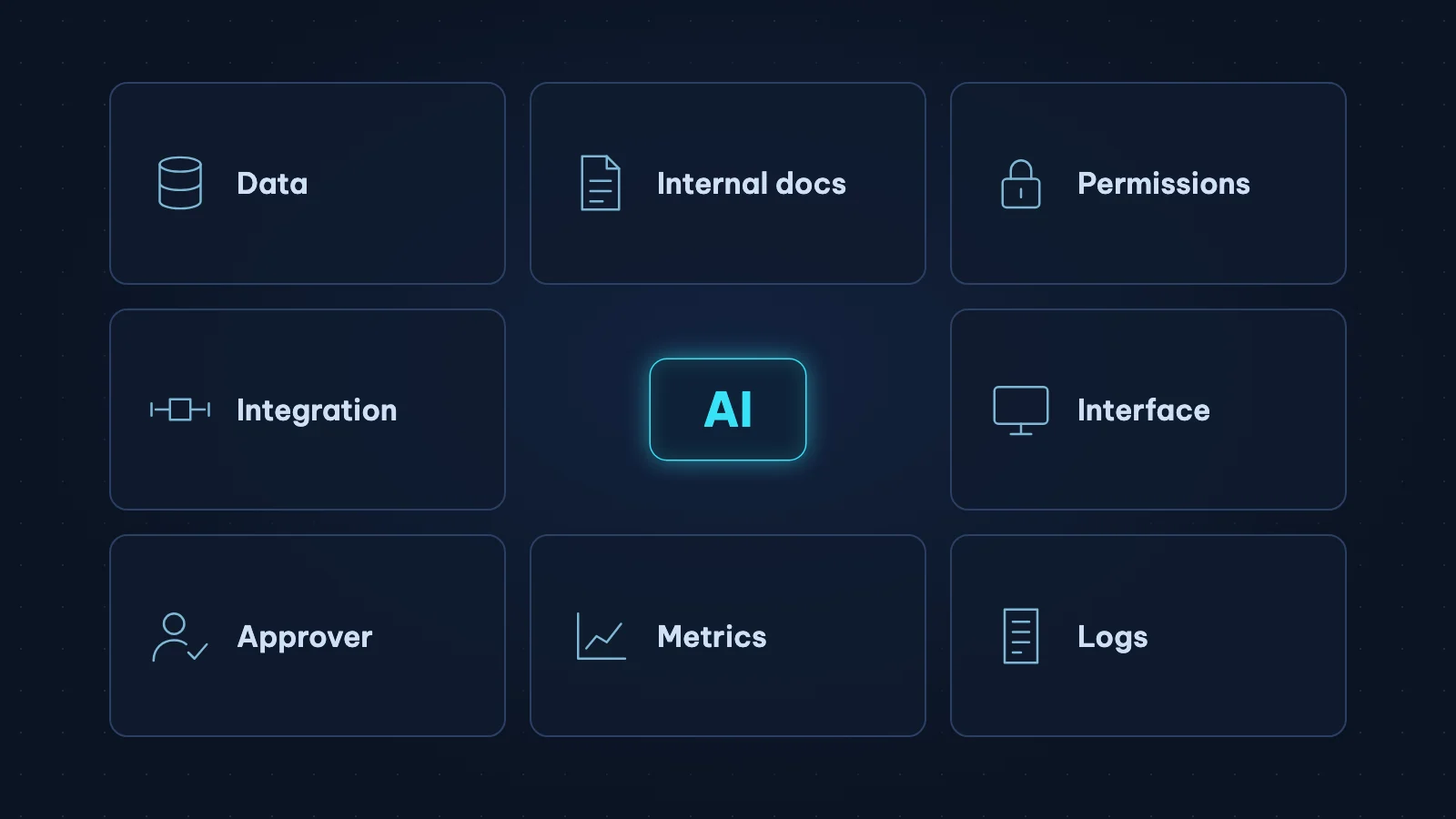
- Data and systems must connect. AI cannot look up inventory if inventory sits in an Excel file on one person’s machine. Often the biggest part of the project is the software around the AI, not the AI.
- Control rules need to be rewritten at the same time. When an approval layer is removed, define clearly what replaces it: automatic thresholds, action logs, random checks.
Where should a company start?
The easiest way is to choose the process that hurts the most today, where employees complain the most or customers wait the longest, then go through the 5 steps above together with the people who run that process every day. This needs someone who understands both the front line and the technology: close enough to users to see the real process, and technical enough to know what AI and software can do and how far.
That is how an FDE (Forward Deployed Engineer) works: sitting with the operations team, redrawing the process, building a trial on real data, and staying until the new way of working becomes habit. If you are not sure which problem to start with, you can also read Where should a business start with AI? or assess your readiness with Gartner’s 5-level AI maturity model.
References
- McKinsey & Company, The state of AI in 2025: Agents, innovation, and transformation (11/2025).
- MIT NANDA, The GenAI Divide: State of AI in Business 2025 (07/2025), summarized at Virtualization Review.
- BCG, AI at Work 2025: Momentum Builds, but Gaps Remain (06/2025).
- Paul A. David, The Dynamo and the Computer: An Historical Perspective on the Modern Productivity Paradox, American Economic Review (05/1990).
- Michael Hammer, Reengineering Work: Don't Automate, Obliterate, Harvard Business Review (07/1990).
If you have a process you want to bring AI into but are not sure how far to change it, a short conversation with a TMI AI FDE engineer can help redraw the current process and point out where to start.
Frequently asked questions
Why hasn’t business performance changed even though we use AI?
Usually because AI has only been attached to an old process. Each employee works faster, but the handoffs, approval waits and reporting stay the same, so the processing time and cost of the whole process barely change. Large value comes when the process is redesigned around what AI can do.
What does redesigning a process when applying AI mean?
It means redrawing the work from start to finish on the assumption that AI exists: removing or merging steps that exist only because of human limits (data entry, handoffs, multi-layer checking), letting AI handle the repetitive parts, and placing people at the points that need decisions or accountability.
Is redesigning a process the same as cutting staff?
Not necessarily. The goal is to move people away from repetitive work so they can focus on value-creating work such as making decisions, handling hard cases and caring for customers. Many companies use the time saved to serve more customers without hiring more people.
Which process should we redesign first?
Choose a process that is repeated often, takes many hours of work, has clear measures (processing time, number of errors) and is causing pain for employees or customers, for example handling quotes, reconciling documents, or receiving customer requests.
How long until we see results?
With the right process chosen, you can run a parallel trial on real data within a few weeks and have comparison figures. Scaling across the whole company takes longer, because it also depends on data connections, employee training and changes to permission rules.